

WP File Access Manager
Take control of your media files on your WordPress website.
Ever wondered about uploading files for specific users, or restricting one or more users from accessing a file you uploaded to your WordPress site?
- PNG
- JPG
- ZIP
- DOC
- MP4
- MOV
- XLS
- MP3
- PPT
- CSV
How It Works
It’s super easy to install and work with WP File Access Manager. Learn the steps here - with just a few clicks you can activate the plugin on your website.
-
Download the plugin
- After purchasing the plugin on CodeCanyon, go to the Downloads page.
- Find the plugin in the list and click the green Download button.
- Save the zip file on your computer.
-
Install it via Wordpress Admin
- Log in to wp-admin as an administrator.
- Go to Plugins → Add New and click the Upload Plugin button.
- Click Choose File and select the file you downloaded from CodeCanyon.
- Click Install Now.
- Click Activate Plugin once the installation is done. That’s it – the plugin is installed on your site.
-
Set your restrictions
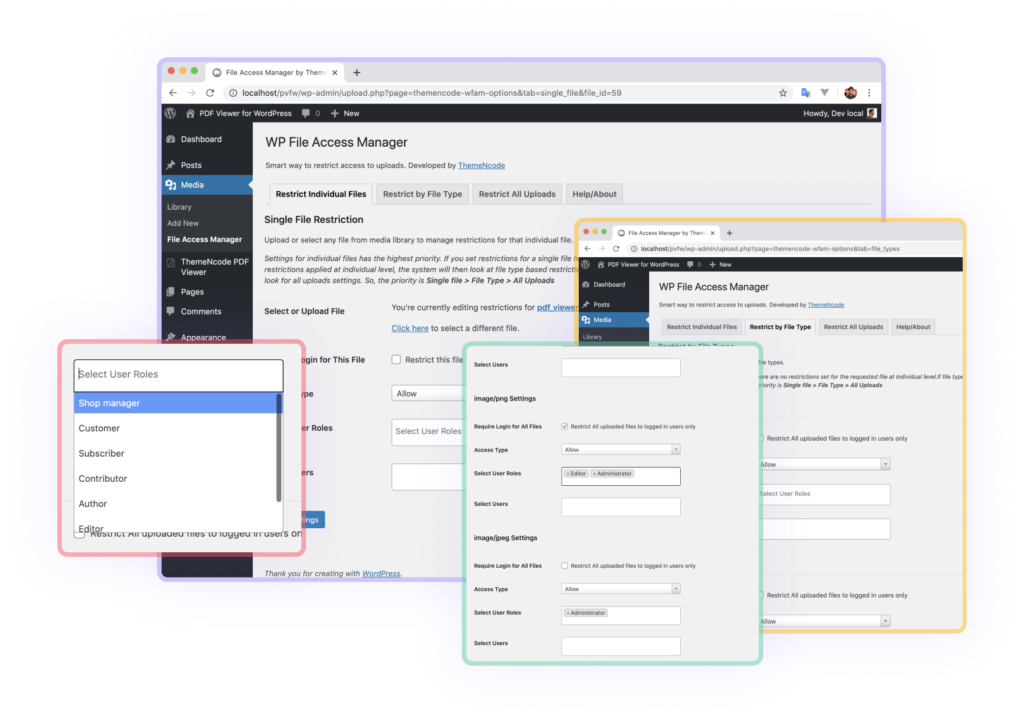
After activating the plugin, you’ll notice a new submenu item under Media called File Access Manager. Click it to open a page with a few tabs.
That’s the interface you’ll use to work with the plugin – simple and straightforward. Every tab and field carries instructions on how it works.
How You’ll Benefit
It restricts visitors who have no permission to see a file, so only the people you choose can see your WordPress files. You can hide files from other users too, based on their roles.
Core Features
WP File Access Manager allows you to control every single file uploaded to the WordPress Media Library.
-
One-click updates
WP File Access Manager has a one-click update feature, so you can update very easily from your WordPress admin area.
-
Lifetime updates
You’ll have access to all the updates without paying anything extra. Only pay once and get lifetime updates.
-
Dedicated support
We ensure the best support. A Regular license comes with 6 months of support; an Extended license provides lifetime support.
-
Protect Every Single File
Control who can access every single file, regardless of file type or size.
-
Easiest Way to Protect WordPress Media Files
You can start protecting the media files of your WordPress site within just a few clicks.
-
Protect Any File Type
For example PDF, JPG, PNG, MP4, MOV, MP3, WAV, ZIP, PPT, DOC, DOCX, CSV, XLS, TXT, GIF and any other file type.
-
Display/Hide by Login Status
Show a file to logged-in users only. With the login requirement enabled, only logged-in users can access the protected file.
-
Display/Hide for User Roles
Show a file to specific user roles only. With role-based restriction enabled, only users with the specified roles can access the protected file.
-
Display/Hide for Individual Users
Show a file to individual users only. Allow or disallow multiple users - only the users you specify can access files with this restriction.
-
Protect Single/Individual File
Set restrictions for every single file. Just select or upload the file and set its restrictions.
-
Protect by File Type
Set restrictions by file type. Enable a restriction for a file type and every uploaded file of that type uses it.
-
Protect All Files
Don’t want to go file by file? Restrict all uploaded media files at once - the setting applies to everything in the WordPress Media Library.
-
Very Lightweight
WP File Access Manager is less than 500KB - very lightweight.
-
Very Well Documented
Well-organised documentation covers everything, though most people can start using it without reading any. It’s that easy!
-
Compatible with Latest WordPress
WP File Access Manager is actively maintained and kept compatible with the latest WordPress.
-
Integrations
It works with TNC FlipBook – PDF viewer for WordPress, the best PDF reader and flipbook plugin, and is compatible with TNC PDF Viewer.
-
Code Quality Verified by Envato/CodeCanyon
WP File Access Manager is sold exclusively on CodeCanyon, and its code quality is tested by the Envato review team.
-
Bulk Protect for All Files
Don’t want to set restrictions for each file or file type? No problem - do it at once for all files.
WP File Access Manager
Our plugin has helped a lot of websites keep unauthorised visitors away from their files. It’s the best way to go when your WordPress files are meant to be seen by specific people only, and it can protect every type of file. Our clients find it very useful, and we have supported them with any issue along the way. It works with WooCommerce too, so you can show your WordPress files only to premium members.
- Accepted file types
- 30+
- Dedicated support
- 24/7
- Happy customers
- 200+
- User rating
- 4.76
Customer Reviews
Here is some feedback from our users. Customer satisfaction is always our first priority, and we try to give full support.
-
“Very simple and useful plugin. Support is very fast and good.”
-
“Works perfectly fine at a much lower cost than competitors. Had a small issue but support fixed it in 20 minutes. Thanks! ”
-
“Great and quick support and the code is awesome! 100% recommended.”
Frequently Asked Questions
Here are the questions we get most often from our users. Have a read before asking for support - and if you don’t find the answer here, contact us through our support hub.
WP File Access Manager is a product of ThemeNcode, so ThemeNcode’s refund policy applies.
The plugin is sold on CodeCanyon. You can pay with PayPal, Skrill (non-US customers only) and credit cards (Visa or Mastercard).
Yes. It comes with a WooCommerce integration.
There is no file size limit, and it works with 30+ file types.
Ask anything through our support hub: support.themencode.com.
Yes. It comes with a WooCommerce integration.
No. It only works on single WordPress installations.