

Do you want to create a perfect Divi website with many useful functionalities? Divi modules are essential components that compose structure and style of your website. One of Divi’s best features is its extensive library of modules. Which can create everything from simple text blocks to complex layouts. You can use Divi modules, extensions or write custom code to create a perfect Divi website. The best way to do this is to use the Divi modules.
Divi modules are very lightweight and easy to use. They are also fully compatible with other WordPress themes and plugins, so you can use any module without hesitation. Divi is also highly customizable. Whether you are a beginner designer or a pro, this guide will help you create the perfect Divi website.
Table of Contents
Essential Steps to Improve Your Divi Website
You can take some basic steps to make your website perfect. Now let’s explore some essential steps to improve your website:
- Attractive Homepage: Your homepage is the gateway to your digital world and a chance to make a solid first impression.
- Typography: Choosing the right font for your website can establish your brand and grab user attention.
- Color Psychology: Color reflects emotions and affects the perception of your website.
- Customization: Divi offers a wealth of customization options. Customize your website according to your niche.
- Visual Storytelling: Pictures and visuals are worth a thousand words. Add meaningful images to highlight your website.
- Mobile Responsiveness: Ensure your website looks and works on different screen sizes.
- Implement SEO: Research and incorporate relevant keywords into your content.
- Optimize for Speed: Reduce image file size without compromising quality, enable browser caching, and reduce file size to improve load times.
How to Choose Perfect Divi Modules?
Choosing a suitable modules for your Divi website is paramount. When selecting, consider your website’s purpose, target audience, and brand identity. Whether you’re building a simple portfolio site or a complex eCommerce store, Divi modules help you in every aspect. Once you select your module, the fun begins.
Do your research to find the best Divi modules that can meet all your needs. We have done a lot of research and found Infinity “TNC Divi Modules Pro.” A perfect combination of functional modules for your Divi website. Simply drag and drop the necessary modules and integrate elements. A free version is also available.

Modules Included in TNC Divi Modules Pro
Image Hotspot: You can define hotspot areas on the image and create interactive hotspots with clickable areas that link to specific content or actions. You can create product demos, maps, and much more.

Image Magnifier: It allows visitors to zoom in on specific image areas by hovering over them. You can showcase product details and highlight property features.

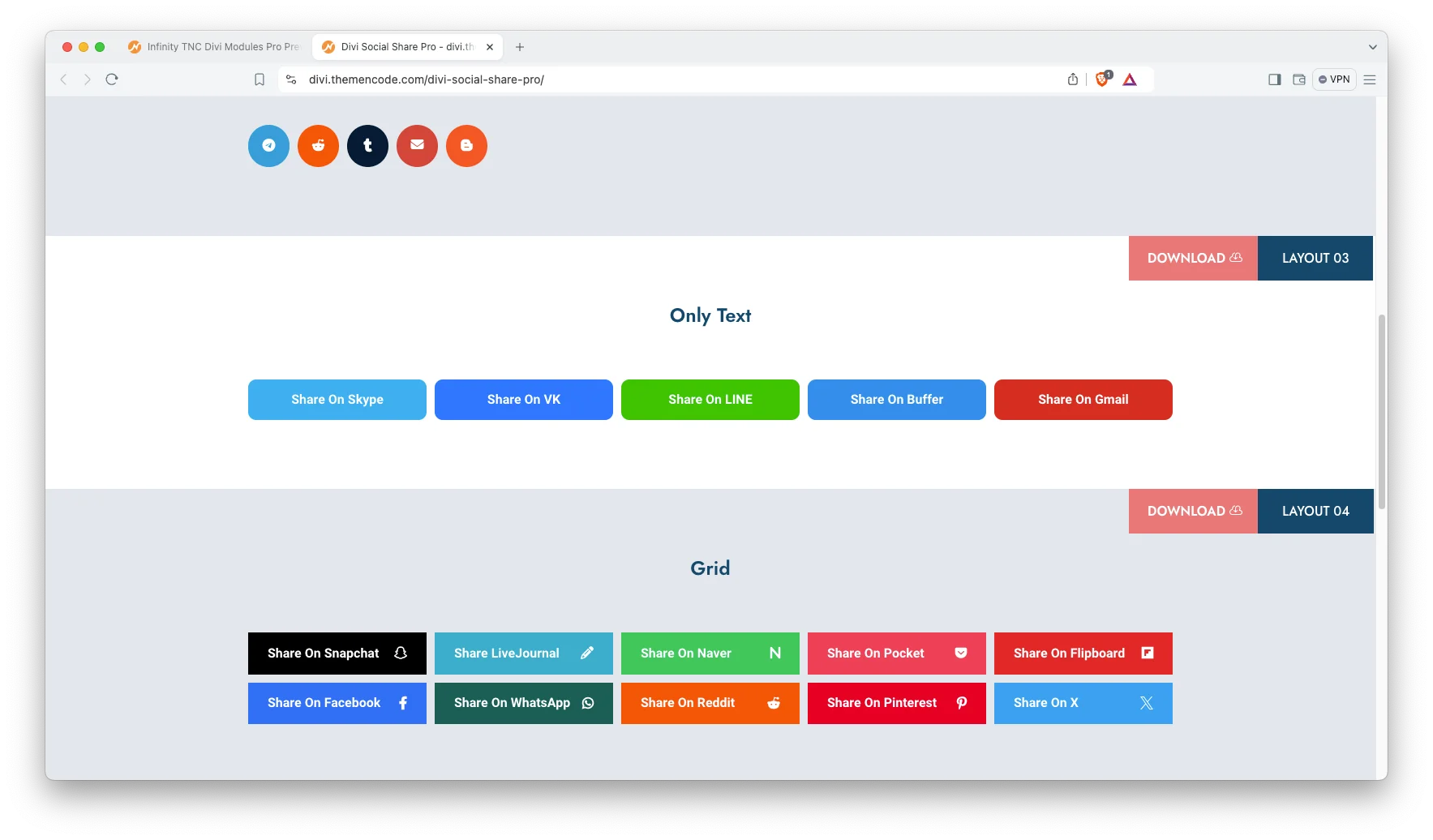
Social Share: Social sharing module allows visitors to easily share your content across their social media platforms like Facebook, WhatsApp, Twitter, Pinterest, Linkedin, Telegram, Reddit, Tumblr, Email, Blogger, and more with just one click.
Modal Popup: This module lets you make the best use of various trigger types and many flexibilities. You can display sign-up forms, product details, image galleries, and much more.

Step Flow: This module ensures that content or instructions are arranged in numbered or bulleted steps.

Dual Buttons: This module offers clear choices to guide visitors toward desired actions. You can show visitors two distinct CTAs, allowing them to choose the path that best aligns with their needs.

Image Carousel: You can showcase your product galleries, portfolio highlights, or image collections dynamically and engagingly.

Heading Gradient: Improve your Divi site headline title with this heading gradient module.

Heading Typewriter: Ideal for dramatic introductions or highlighting product features.
Embed Map (Google map): Easily pinpoint your location, guide visitors with interactive maps, and improve discoverability for a global audience.

YouTube Video: Just drag and drop the module, enter the YouTube video URL, and watch your content appear as your website layout.
Vimeo Video: Display high-quality video content effortlessly with our Vimeo integration module.

Testimonials Carousel: Display customer reviews or testimonials in a rotating slider and a carousel view using the power of this module.

Logo Carousel: Create an attractive display of your client, partner, or sponsor logos using a rotating carousel with this module.

Team Carousel: Quickly create a dynamic, engaging team showcase highlighting your employee’s expertise.

Star Rating: It allows customers to rate and review your offers with our star rating module.

How to Get TNC Divi Modules Pro?
Since Infinity TNC Divi Modules is a premium plugin, here are detailed instructions:
- Enter the elegantthemes marketplace or Click Here.
- Search for “Infinity TNC Divi Modules Pro” in the search bar.
- Once you find the plugin, click “Buy Now”.
- Once you have downloaded the plugin, log in to your website admin panel.
- Select the plugin zip file you downloaded and install it.
- Go to Plugins in your WordPress admin panel and activate the plugin.
How to Use Infinity TNC Divi Modules Pro?
- Open Your Divi Builder: Create a new page or edit an existing one.
- Locate the Modules: In the Divi Builder sidebar, find the “Infinity TNC Divi ” section.
- Drag and Drop your modules: Simply drag and drop the desired module onto the desired location on your page or post.
- Customization: Each module has intuitive settings for its appearance and functionality. Edit colors, text, layout, and more to match your website’s style perfectly.
Conclusion
A perfect Divi website should include all the necessary functionalities and be user-friendly. If you follow these design principles and practical tips outlined in this blog, you can create a perfect Divi website and achieve your online goals. It is essential to use unique modules that are relevant to your target audience.
Infinity TNC Divi Modules Pro is a bundle of resources for Divi users. These modules are designed to improve website performance. It saves you time and helps you create a professional looking website. With all these modules and creativity, you can make a perfect Divi website that attracts visitors and drives conversions.
Don’t forget to follow ThemeNcode for exciting updates and more upcoming products.



0 Comments